Stay on top of what matters
Notion Mail shut down on 22 September 2026. Users’ mail is still safe in Gmail, but the views and reminders that kept work moving are gone. This article compares the replacement lists, and what they do not provide.



Notion Mail closed on 22 September 2026. If you used it, you did not lose much. Gmail opens as usual, and every message is where it was. What is gone is easy to overlook: the custom sorting of your inbox, the labels that applied themselves, and the reminders that brought a thread back when it was time to follow up.
Notion said plainly why. Announcing the shutdown in June, it said more than half of Notion Mail users were already managing their email without opening the inbox, leaving the work to Notion’s agents, and that it was going all in on agents (TechCrunch).
Most of what has been written online about Notion Mail alternatives compares email clients: which is fastest, which labels best, which costs least. Those are fair questions. This article is about the one thing they leave out: keeping a piece of work that runs across many threads moving, and chasing it when it is time, without holding all of it in your head.
What closed, and what survived
Notion Mail always synced two ways with Gmail, so everything you sent or received through it is still in Gmail. Notion’s help page on the shutdown (archived copy; the live page now redirects to the help centre) listed what lived only in Notion Mail and had to be saved by 21 September.
| Notion Mail only | Where it can go now |
|---|---|
| Drafts | Gmail Drafts, if you migrated them before the 21st |
| Scheduled emails | Gmail’s Scheduled folder, on the same condition |
| Snippets | Any client with templates. Files attached to a snippet had to be downloaded separately |
| Auto-label instructions | Gmail filters, or, as Notion suggests, a Notion Custom Agent with Gmail access |
The same page names what could not be moved to any other app: the way your inbox was organised, meaning its custom views and sorting, and the reminders set on emails.
Some of Notion’s email features carry on. The Gmail AI Connector still lets Notion AI search Gmail and draft replies, mail blocks already in Notion pages keep working, and agents with Gmail tools keep running. If your habits were built around those, less has changed for you.
If you missed the export, the drafts and scheduled sends are gone, but the conversations are not. What needs rebuilding is the structure you had put on top of them.
Notion Mail alternatives
Plenty of replacement lists have appeared since. The clearest is Slashy’s Notion Mail alternatives in 2026, published on 21 September, the day before the shutdown. Slashy is on its own list, alongside Shortwave, Superhuman, Spark and Gmail with Gemini. The comparison covers which email providers each supports, whether it can replace Notion Mail’s auto-labels, snippets and scheduled sends, and price.
That is a sensible way to choose an email client. Speed, search, drafting, labels and a free plan are real needs, and each of these tools has its strengths. If what you liked most about Notion Mail was a calm, well-sorted inbox, one of them will probably suit you well.
But every one of them is built around the stream of messages: it makes each email quicker to read, label, answer or find. None of them pulls together the work buried in the pile.
Take a customer renewal. The price is agreed in one thread, legal sends redlines in another, the signed copy comes back through DocuSign in a third, and finance confirms billing in a fourth. Across three weeks, the renewal’s emails never stay at the top of your inbox for long. A faster client shows you each of them sooner. It does not tell you that the whole renewal is stuck in one email that has sunk out of sight, though you asked for the signature nine days ago.
For many Notion Mail users, views and reminders kept this going by hand: a view that gathered everything from one client, a reminder to chase on Friday. Move to another client and your inbox comes with you. That way of working does not, and none of those lists will bring it back.
The point is seeing what matters, straight away
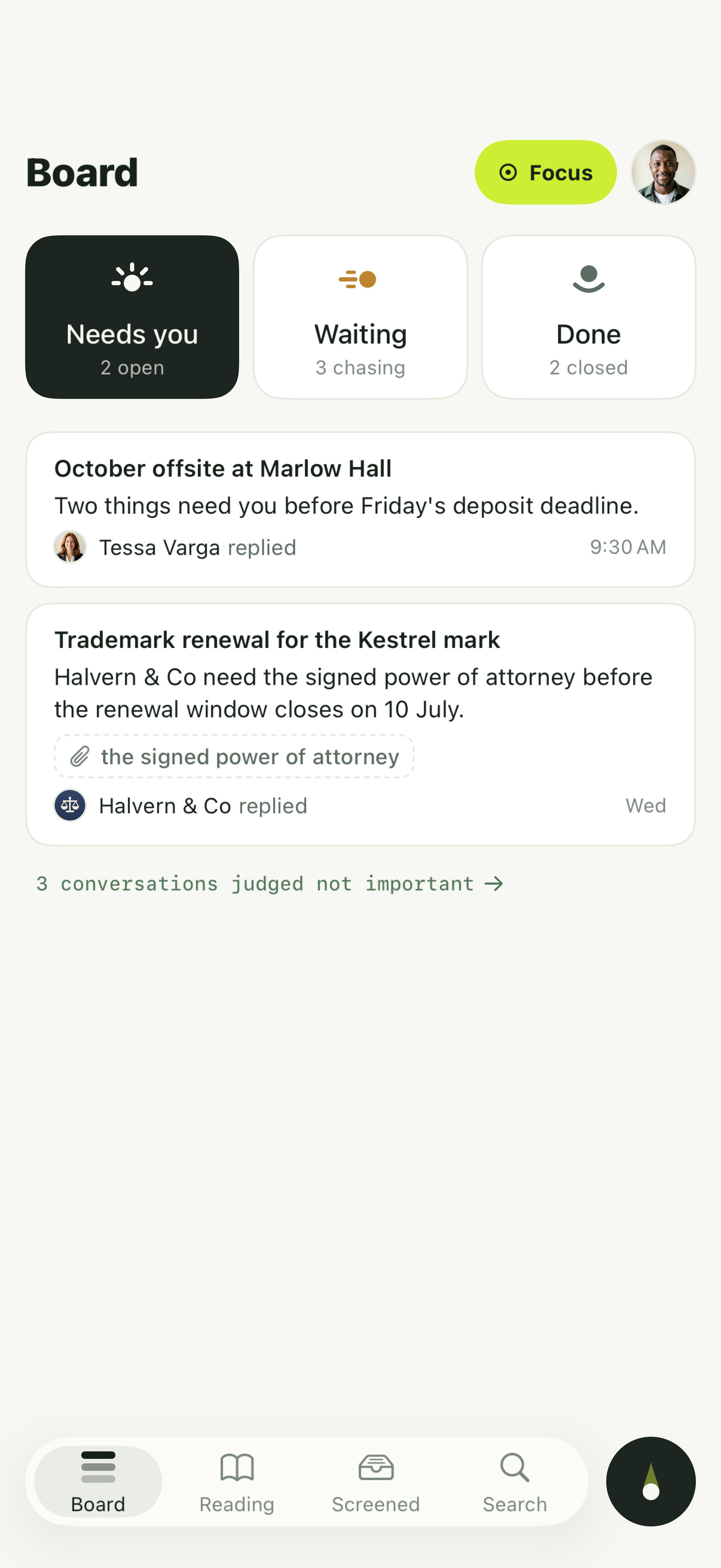
Pingbo is an AI email agent that works on top of the Gmail you already have. Its unit is not the message or the thread but the Matter: every thread about one piece of work gathered in one place, with its people, commitments, deadlines and next move, kept until the work is done. Pingbo builds Matters from your mail and keeps them up to date. You do not file anything.
Matters sit on one board, in two lanes. Needs you holds what you owe. A To Respond card means someone asked something you should answer, and the reply is already drafted. A To Act card means the next step is outside email, like signing a form, and the card names it. Waiting holds everything still live that asks nothing of you today. When you are waiting on someone, Pingbo sets a date to follow up, and on that date the Matter comes back, naming who to chase and for what. It is the reminder Notion Mail made you set by hand, set for you from what the thread actually says.
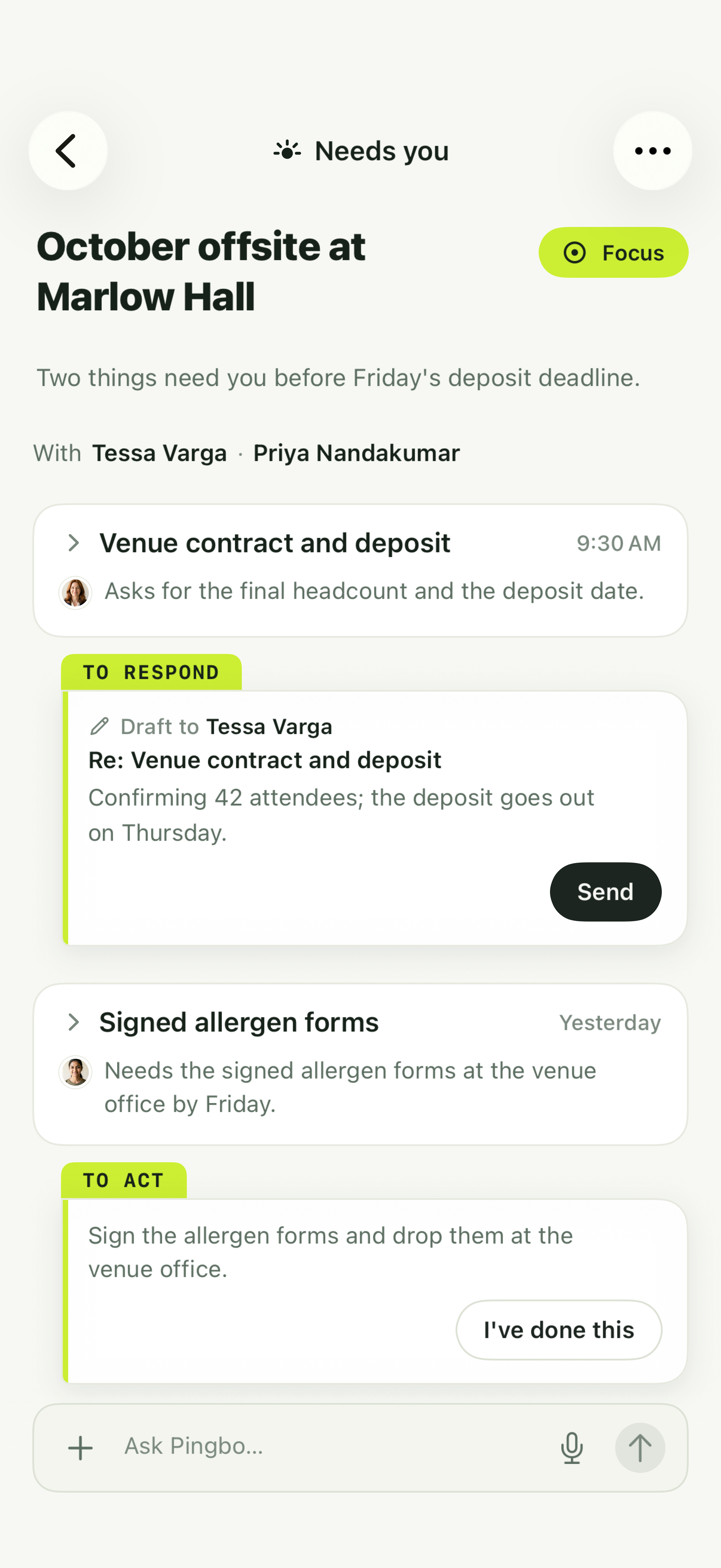
Notion is betting on an agent that runs your inbox for you. We are betting that the moment you open Pingbo, you know which pieces of work are waiting on you and where each one is stuck, without combing through your inbox to remember. Drafting a reply and waiting for you to press Send is something every AI inbox does now, and a draft is only one step in a Matter. Once the work is clear, you have room to decide what to say. Nothing leaves your Gmail without your permission, and how much you allow is up to you.
Feature comparison
The table draws on Slashy’s roundup and each product’s public pages, with prices as the roundup listed them on 21 September.
| If what you need is… | Worth a look |
|---|---|
| A fast Gmail client with AI drafting and auto-labels | Slashy or Superhuman, both $30 a month, less when billed annually |
| Free, or included in a service you already pay for | Shortwave Free, Spark Free, or Gmail with Gemini, which comes with Google Workspace |
| Outlook or Microsoft 365 alongside Gmail | Superhuman or Spark |
| Searching years of Gmail history | Shortwave’s Premier or Max plans |
| Knowing what is waiting on you the moment you open it, with work across many threads followed through to done | Pingbo, free during the beta, Gmail only for now |
There is no overall winner in that table; each tool fills a different gap. But you do not have to choose between a tidy inbox and a grip on the work.
Pingbo gathers related email into Matters on one board: what you owe sits in Needs you, newsletters go to Reading, and conversations that do not matter are set aside where they cannot get in the way. It starts with your most recent mail, then works back through your whole Gmail in the background. Everything it has imported is searchable, and Ask Pingbo can find it too. When it is time to chase, the Matter comes back to you on its own, with the reply already drafted.
If staying on top of what matters is what you want
Pingbo is in a free beta and works with Gmail today. We are choosing a first group of early users. If you have ever found out days later that a piece of work was stuck on one buried email, join the beta.